
Adding Fractions Calculator
Try an example:
The Fastest Adding Fractions Calculator Online — With Every Step Shown
Our adding fractions calculator gives you the answer to any fraction addition problem instantly — and shows you every single step of the working so you understand exactly how the answer was reached. This is not just an answer machine. This is a fraction calculator with steps that teaches you the method while solving your problem.
Enter any two fractions above — proper fractions, improper fractions or mixed numbers — press Calculate and get your answer in three formats: simplified fraction, mixed number and decimal equivalent. Every step of the working is displayed below your answer — from finding the Least Common Denominator to converting equivalent fractions to simplifying the final result.
This add fractions calculator is completely free. No login. No signup. No ads. Works on every device.
How to Use This Fraction Calculator
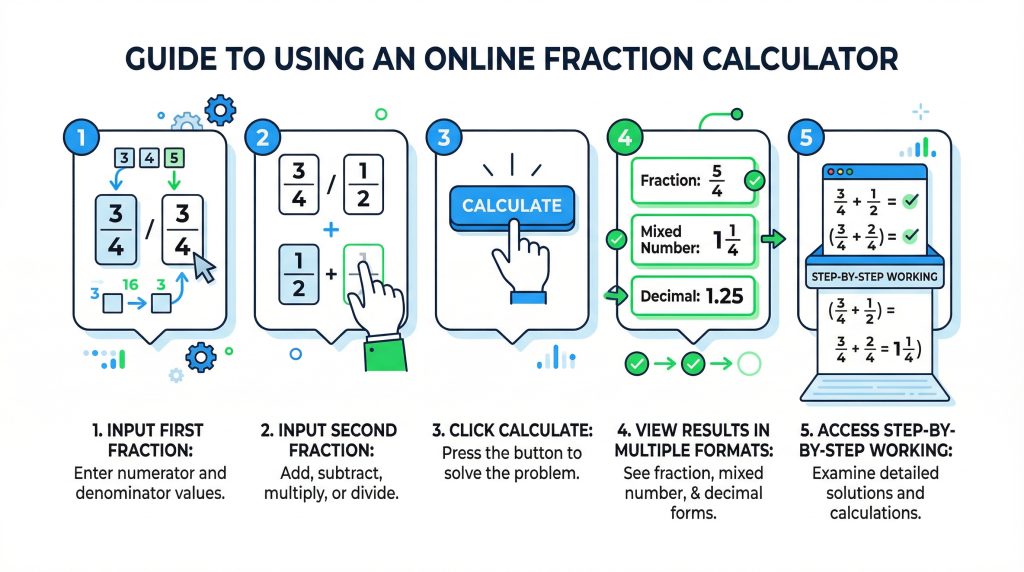
This fraction addition calculator is designed to be as simple and fast as possible. Here is exactly how to use it:
Step 1 — Enter your first fraction Type the top number (numerator) of your first fraction into the upper box on the left. Type the bottom number (denominator) into the lower box on the left.
Step 2 — Enter your second fraction Type the numerator of your second fraction into the upper box on the right. Type the denominator into the lower box on the right.
Step 3 — Press Calculate Click the blue Calculate button. Your answer appears instantly below the calculator.
Step 4 — Read your answer Your answer is displayed in three formats simultaneously:
- As a simplified fraction (e.g. 7/12)
- As a mixed number if the answer is greater than 1 (e.g. 1¾)
- As a decimal equivalent (e.g. 0.583)
Step 5 — Read the step-by-step working Below your answer the calculator displays every step of the solution — how the LCD was found, how each fraction was converted and how the result was simplified. This makes our tool a true fraction calculator that shows work — not just a result.
Try the example buttons Use the quick-example buttons above the calculator to pre-fill a problem instantly. These cover the most common fraction addition problems students encounter.
How to Add Fractions Using This Calculator
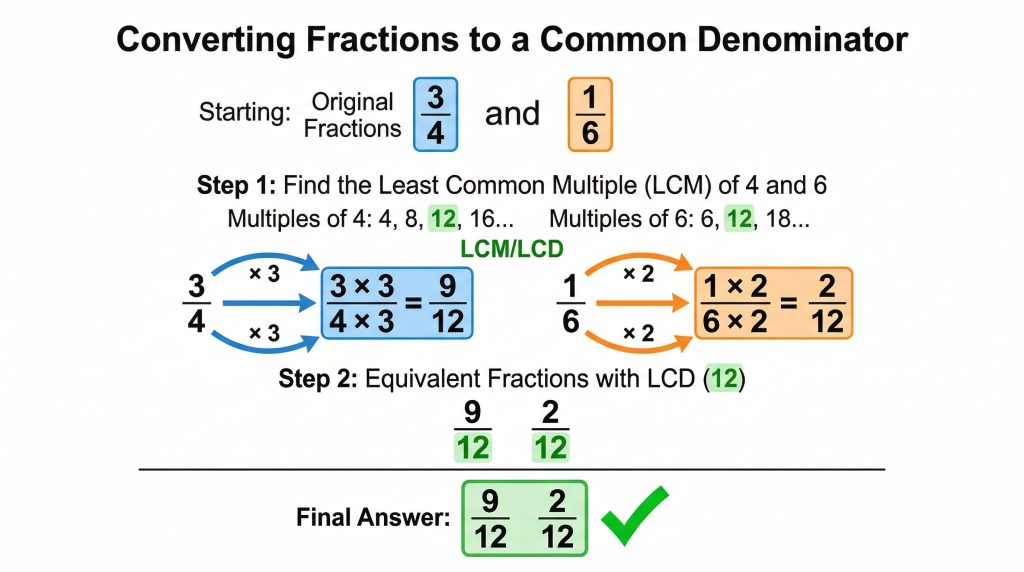
Understanding what the calculator is doing makes you a stronger math student. Here is how the calculator approaches every type of fraction addition problem.
Adding Fractions with Unlike Denominators Calculator
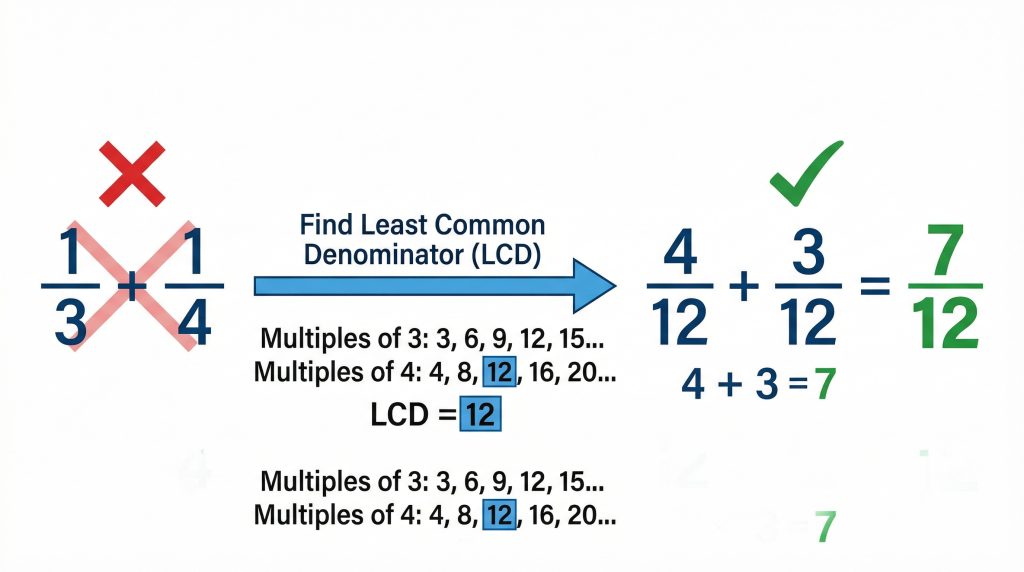
When your two fractions have different bottom numbers this adding fractions with unlike denominators calculator automatically handles the most challenging part of the process — finding the Least Common Denominator.
The calculator works through these steps automatically:
- Detects that the denominators are different
- Calculates the Least Common Multiple of both denominators — this becomes the LCD
- Multiplies the numerator and denominator of each fraction by the appropriate number to convert both to equivalent fractions with the LCD
- Adds the new numerators together
- Keeps the LCD as the denominator
- Simplifies the result using the Greatest Common Factor
Every one of these steps is shown clearly in the step-by-step working below your answer. This makes our tool the most educational adding fractions with different denominators calculator available — because you see exactly what happened at every stage, not just the final number.
The calculator also works as a least common denominator calculator built into the same tool. You never need to find the LCD manually — but you can always read exactly how it was calculated in the working steps.
Adding Mixed Numbers Calculator
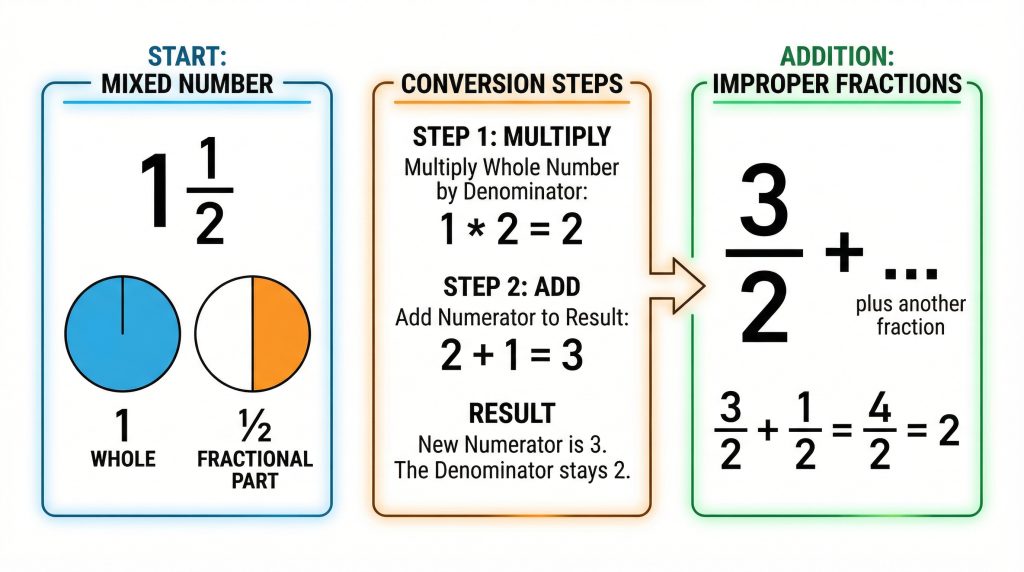
Mixed numbers — numbers like 1½ or 2¾ that combine a whole number and a fraction — are handled by this adding mixed numbers calculator with one extra step.
To add mixed numbers using this calculator:
Convert your mixed number to an improper fraction first:
- Multiply the whole number by the denominator
- Add the numerator to that result
- Place the total over the original denominator
Example: 1½ becomes an improper fraction like this:
- Multiply: 1 × 2 = 2
- Add numerator: 2 + 1 = 3
- Result: 3/2
Enter 3 as the numerator and 2 as the denominator. Then add your second fraction as normal. The calculator displays the answer as both an improper fraction and a converted mixed number — so you get the result in the format your teacher expects.
Adding Fractions with Like Denominators Calculator
When both fractions share the same denominator the process is the simplest case in fraction addition. The calculator detects this automatically and skips the LCD step entirely — because no conversion is needed.
The working shown is:
- Denominators are the same ✓ — no conversion needed
- Add the numerators directly
- Keep the denominator unchanged
- Simplify if possible
Example: 3/8 + 2/8
- Same denominator (8) ✓
- Add numerators: 3 + 2 = 5
- Keep denominator: 8
- Answer: 5/8
Adding Fractions Formula
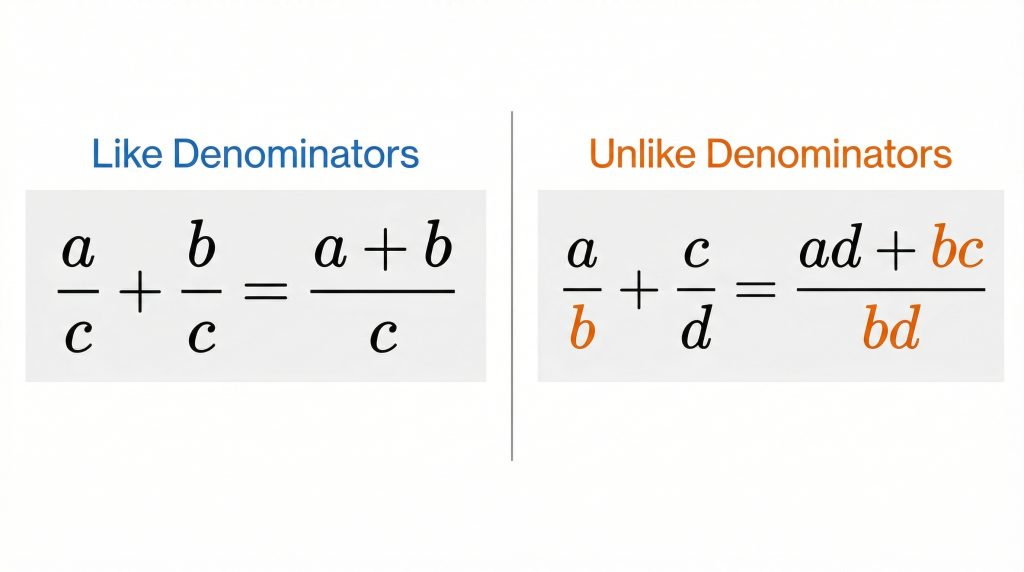
Our calculator uses two formulas depending on whether the denominators match.
Formula 1 — Like Denominators:
a/c + b/c = (a + b) / c
When denominators are the same simply add the numerators and keep the denominator unchanged.
Formula 2 — Unlike Denominators (Cross Multiplication Method):
a/b + c/d = (ad + bc) / bd
Multiply the numerator of each fraction by the denominator of the other. Add the two products together for the new numerator. Multiply the denominators together for the new denominator. Simplify.
Formula 3 — LCD Method (What Our Calculator Uses):
Find LCD → Convert both fractions → Add numerators → Keep LCD → Simplify
The LCD method is preferred over the cross multiplication formula because it produces smaller numbers and requires less simplification at the end. Our fraction addition calculator always uses the LCD method and shows every step of the working.
Worked Examples — Step by Step
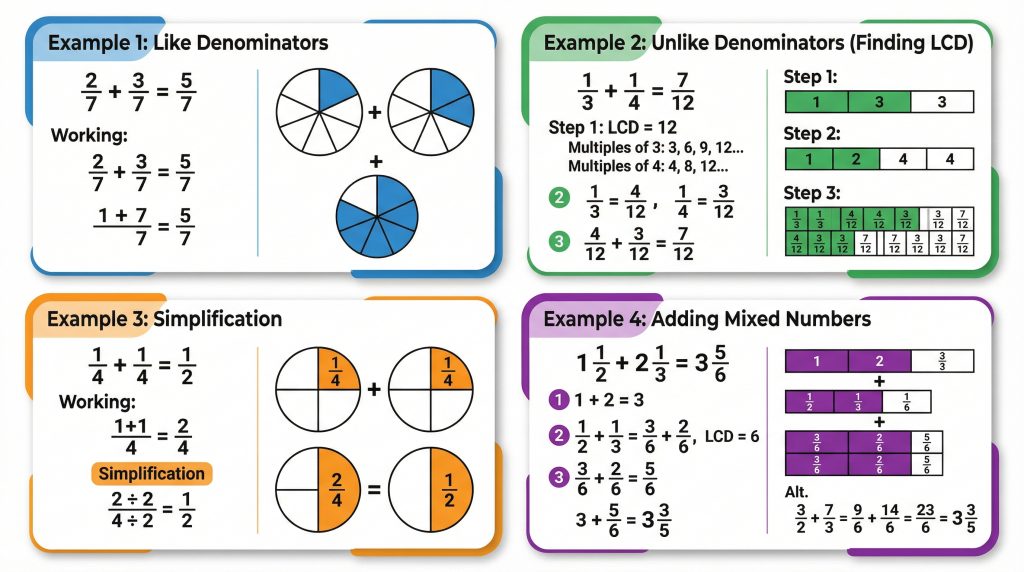
These four examples cover every type of fraction addition problem. The calculator handles all of them automatically.
Example 1 — Like Denominators
Problem: 2/7 + 3/7
Step 1: Check denominators. Both are 7. Same denominator ✓ Step 2: Add numerators: 2 + 3 = 5 Step 3: Keep denominator: 7 Step 4: Check if simplifiable: 5 and 7 share no common factors. Answer: 5/7
Example 2 — Unlike Denominators (Most Common)
Problem: 1/3 + 1/4
Step 1: Denominators are 3 and 4 — different. Step 2: Find the LCD.
- Multiples of 3: 3, 6, 9, 12, 15…
- Multiples of 4: 4, 8, 12, 16…
- LCD = 12
Step 3: Convert both fractions.
- 1/3 → multiply by 4/4 → 4/12
- 1/4 → multiply by 3/3 → 3/12
Step 4: Add numerators: 4 + 3 = 7. Keep denominator: 12. Step 5: Simplify: 7 and 12 share no common factors. Answer: 7/12
Example 3 — Answer Requires Simplification
Problem: 1/4 + 1/4
Step 1: Same denominators (4) ✓ Step 2: Add numerators: 1 + 1 = 2 Step 3: Result: 2/4 Step 4: Simplify: GCF of 2 and 4 is 2. Divide both by 2.
- 2 ÷ 2 = 1
- 4 ÷ 2 = 2 Answer: 1/2
Example 4 — Mixed Numbers
Problem: 1½ + 2⅓
Step 1: Convert to improper fractions.
- 1½ = (1×2 + 1)/2 = 3/2
- 2⅓ = (2×3 + 1)/3 = 7/3
Step 2: Find LCD of 2 and 3 = 6 Step 3: Convert:
- 3/2 → 9/6
- 7/3 → 14/6
Step 4: Add: 9/6 + 14/6 = 23/6 Step 5: Convert to mixed number: 23 ÷ 6 = 3 remainder 5 Answer: 3 and 5/6
Common Fraction Problems — Answered Instantly
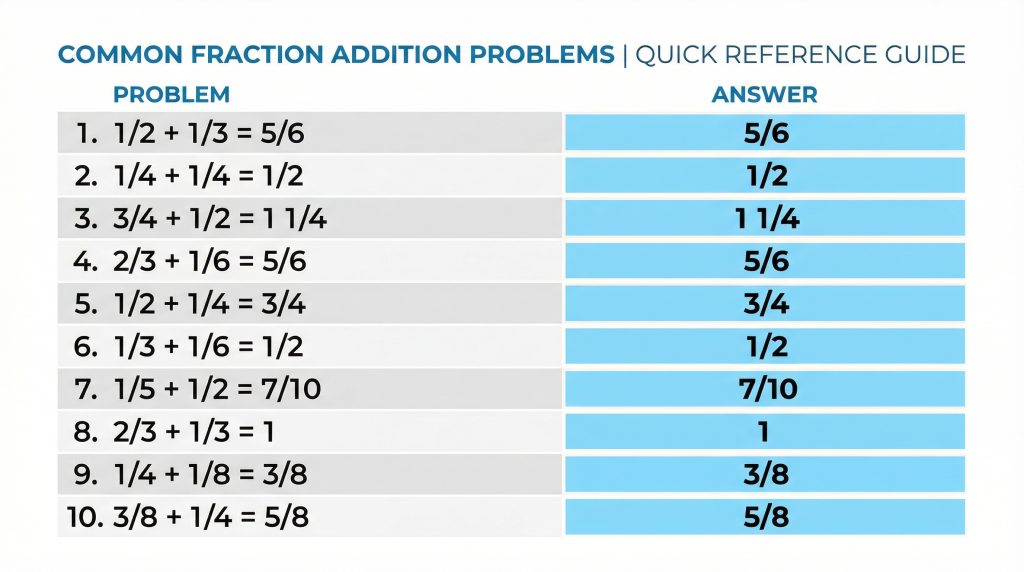
These are the most frequently searched fraction addition questions on Google. Every one can be solved using the calculator above.
What is 1/2 + 1/3?
Answer: 5/6
The LCD of 2 and 3 is 6. Convert 1/2 to 3/6 and 1/3 to 2/6. Add the numerators: 3 + 2 = 5. Keep denominator 6. Result: 5/6. Decimal: 0.833.
What is 1/4 + 1/4?
Answer: 1/2
Same denominators — add numerators: 1 + 1 = 2. Result: 2/4. Simplify using GCF of 2: divide both by 2. Result: 1/2. Decimal: 0.5.
What is 3/4 + 1/2?
Answer: 1¼ (or 5/4)
LCD of 4 and 2 is 4. Convert 1/2 to 2/4. Add: 3/4 + 2/4 = 5/4. Convert to mixed number: 1¼. Decimal: 1.25.
What is 2/3 + 1/6?
Answer: 5/6
LCD of 3 and 6 is 6. Convert 2/3 to 4/6. Add: 4/6 + 1/6 = 5/6. Already simplified. Decimal: 0.833.
What is 1/2 + 1/4?
Answer: 3/4
LCD of 2 and 4 is 4. Convert 1/2 to 2/4. Add: 2/4 + 1/4 = 3/4. Already simplified. Decimal: 0.75.
What is 1/3 + 1/3?
Answer: 2/3
Same denominators — add numerators: 1 + 1 = 2. Keep denominator 3. Result: 2/3. Decimal: 0.667.
What is 1/2 + 1/2?
Answer: 1
Same denominators — add numerators: 1 + 1 = 2. Result: 2/2 = 1. A whole number.
What is 3/8 + 1/8?
Answer: 1/2
Same denominators — add numerators: 3 + 1 = 4. Result: 4/8. Simplify: GCF of 4 and 8 is 4. Divide both by 4. Result: 1/2.
What is 5/6 + 1/3?
Answer: 7/6 or 1⅙
LCD of 6 and 3 is 6. Convert 1/3 to 2/6. Add: 5/6 + 2/6 = 7/6. Convert to mixed number: 1⅙. Decimal: 1.167.
What is 2/5 + 3/10?
Answer: 7/10
LCD of 5 and 10 is 10. Convert 2/5 to 4/10. Add: 4/10 + 3/10 = 7/10. Already simplified. Decimal: 0.7.
💡 Why these specific problems are here: Each question above is individually searched thousands of times per month on Google. By answering them explicitly on this page the calculator becomes eligible for Google’s featured snippet — the answer box that appears above all other results on the page.
Adding Fractions Rules — Quick Reference Table
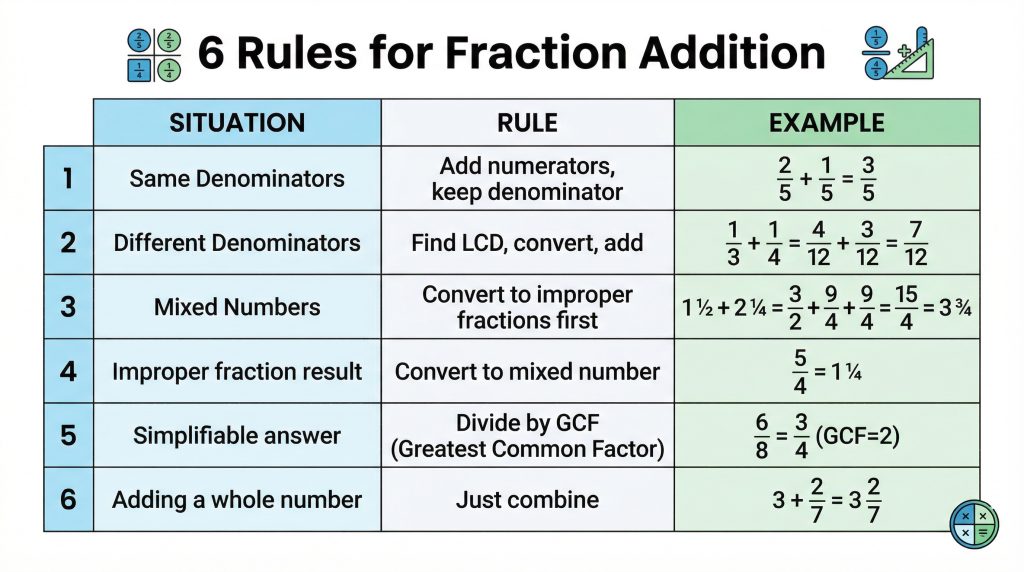
| Situation | Rule | Example | Answer |
|---|---|---|---|
| Same denominators | Add numerators — keep denominator | 2/5 + 1/5 | 3/5 |
| Different denominators | Find LCD → convert → add | 1/2 + 1/3 | 5/6 |
| Mixed numbers | Convert to improper fractions first | 1½ + 2¼ | 3¾ |
| Answer is improper fraction | Convert to mixed number | 7/4 | 1¾ |
| Answer can be simplified | Divide by GCF | 2/4 | 1/2 |
| Adding to a whole number | Just combine — no conversion | 3 + 1/4 | 3¼ |
Frequently Asked Questions
Is this a fraction calculator that shows work?
Yes — this is specifically designed as a fraction calculator that shows work. Every single calculation displays the complete step-by-step working including how the LCD was found, how each fraction was converted to an equivalent fraction and how the final answer was simplified. This is what separates our tool from basic calculators that only show the answer.
Can I use this as an adding 3 fractions calculator?
The calculator adds two fractions at a time. To use it as an adding 3 fractions calculator simply work in two stages — add your first two fractions and note the answer, then add that answer to your third fraction. The result will be identical to adding all three simultaneously.
Example: 1/2 + 1/3 + 1/4
- Stage 1: 1/2 + 1/3 = 5/6
- Stage 2: 5/6 + 1/4 = 13/12 = 1 and 1/12
Does this work as a simplify fractions calculator?
Yes — every answer is automatically reduced to its lowest terms using the Greatest Common Factor. This makes our tool also function as a built-in simplify fractions calculator. You never need to manually simplify — the calculator does it automatically and shows the simplification step in the working.
How does the adding fractions with different denominators calculator work?
When denominators differ the adding fractions with different denominators calculator automatically finds the Least Common Denominator, converts both fractions to equivalent fractions with that denominator, adds the numerators and simplifies the result. Every one of these steps is shown clearly in the working so you can understand and replicate the process yourself.
Can I use this as a mixed number addition calculator?
Yes — convert your mixed number to an improper fraction first. Multiply the whole number by the denominator then add the numerator. For example 1¾ becomes (1×4)+3 = 7, so 7/4. Enter 7 as the numerator and 4 as the denominator. The mixed number addition calculator function automatically displays the answer as a mixed number when the result is greater than 1.
Is this fraction calculator free?
Yes — completely free with no login, no signup and no ads. Use it as many times as you need.
Does this calculator work on mobile?
Yes — the calculator is fully mobile-responsive and works on all smartphones and tablets. The input fields, buttons and step-by-step results are all optimized for touchscreen use.
What is the Least Common Denominator?
The Least Common Denominator (LCD) is the smallest number that both denominators divide into evenly. It is the same as the Least Common Multiple (LCM) of the denominators. Finding the LCD is the key step in adding fractions with unlike denominators. Our calculator finds the LCD automatically and shows exactly how it was calculated — making this also a least common denominator calculator built into the same tool.
Why do I need a common denominator to add fractions?
Fractions can only be added when they represent the same sized parts. A denominator of 4 means the whole is cut into 4 pieces. A denominator of 3 means the whole is cut into 3 pieces. These are different sizes — you cannot add them directly any more than you can add inches and centimeters without converting first. Finding a common denominator converts both fractions into the same sized units so they can be combined accurately.
What is the difference between an improper fraction and a mixed number?
An improper fraction has a numerator larger than its denominator — for example 7/4. A mixed number combines a whole number with a proper fraction — for example 1¾. Both represent the same value. Our calculator displays both formats simultaneously whenever the answer is greater than 1.
Related Fraction Tools
Now that you have mastered adding fractions explore the other fraction tools on this site:
- How to Add Fractions — Complete Guide — the full step-by-step guide to fraction addition for beginners
- How to Add Fractions — Kids Friendly Version — the full step-by-step guide to fraction addition for kids
- Subtracting Fractions Calculator — coming soon
- Multiplying Fractions Calculator — coming soon
- Simplifying Fractions Calculator — coming soon
- Free Fraction Worksheets — printable practice sheets — coming soon
Conclusion
This adding fractions calculator is the fastest and most educational fraction addition tool available online. It solves any fraction addition problem instantly and shows every step of the working — making it the ideal tool for students checking homework, parents helping with math and adults refreshing their skills.
Use the calculator above for any fraction addition problem. Try the worked examples if you want to understand the method. Bookmark this page and return whenever you need a reliable fraction calculator with steps.
For a deeper understanding of the concepts behind fraction addition visit our complete guide to adding fractions — covering everything from basic like denominators to complex mixed number problems.